To be upfront – this was quite sometime ago, so I don’t remember the sequence of screens very well. But I did my best to piece together some of the screens that I had saved.
Clearly this is the first screen you land on. I don’t think I have sufficient words to describe what I’m looking at. Everything that I learnt about UI and UX – goes out the window! The masterpiece:
You first notice the 4 politicians sitting in the header. Don’t ask me why. Limelight maybe, as they always need?
And of course, you have not one, but two columns of scrolling data. And if that isn’t sufficient – you also have badges that say ‘New’ and blinking furiously to draw your attention. The umpteen buttons and cards that you have the option to click on – if you ever reach a decisive point what you’d like to actually click.
Then of course, there’s the familiar registration form with a login button below it, but there’s also one called VLE Login in red grabbing for attention…and wait, there’s one more called Citizen Login on the top right. Which one should a user click?!
I could go on with this page, but I don’t want to belabor the point that it is a UX mess.
Required Documents:
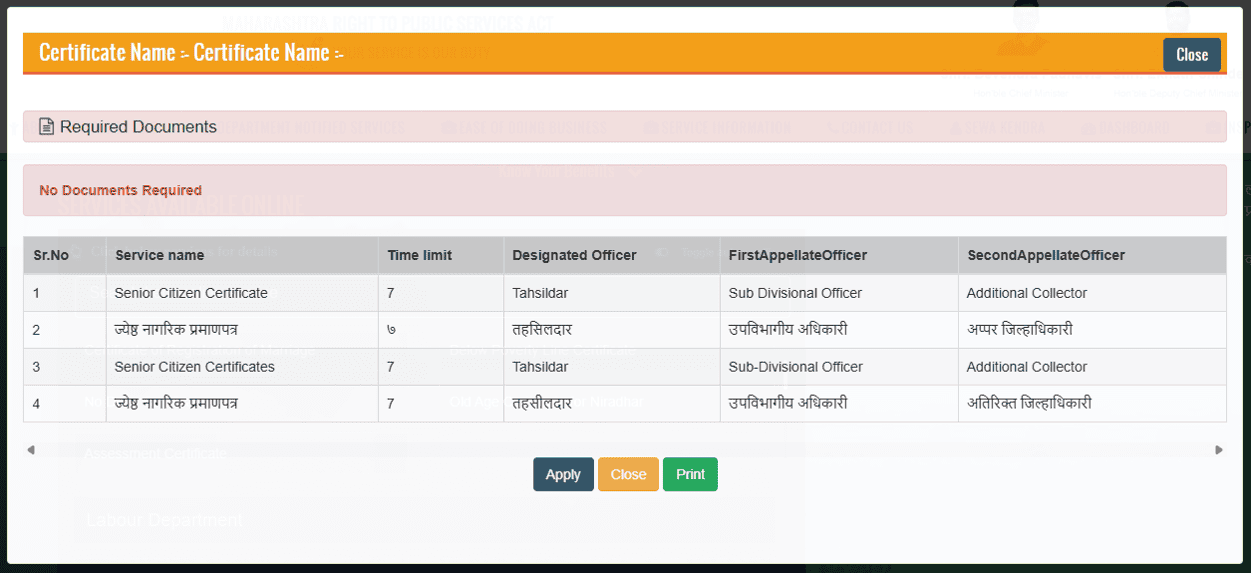
I don’t recall exactly what triggers this modal, but it does pop-up before logging into the account. The page name ‘Certificate Name’ is repeated twice for some reason.
There’s a text called ‘Required Documents’ right above another text that says ‘No Documents Required’. Confusing much? I’d say definitely yes.
Then the table that has 4 entries but they seem to be repeated again for reasons that I cannot figure out. The first and the third entries are for Senior Citizen Certificate – singular and plural.
You can tell I was confused already as to which one to click to proceed. And when I clicked on the Apply button, I was greeted with the following message:
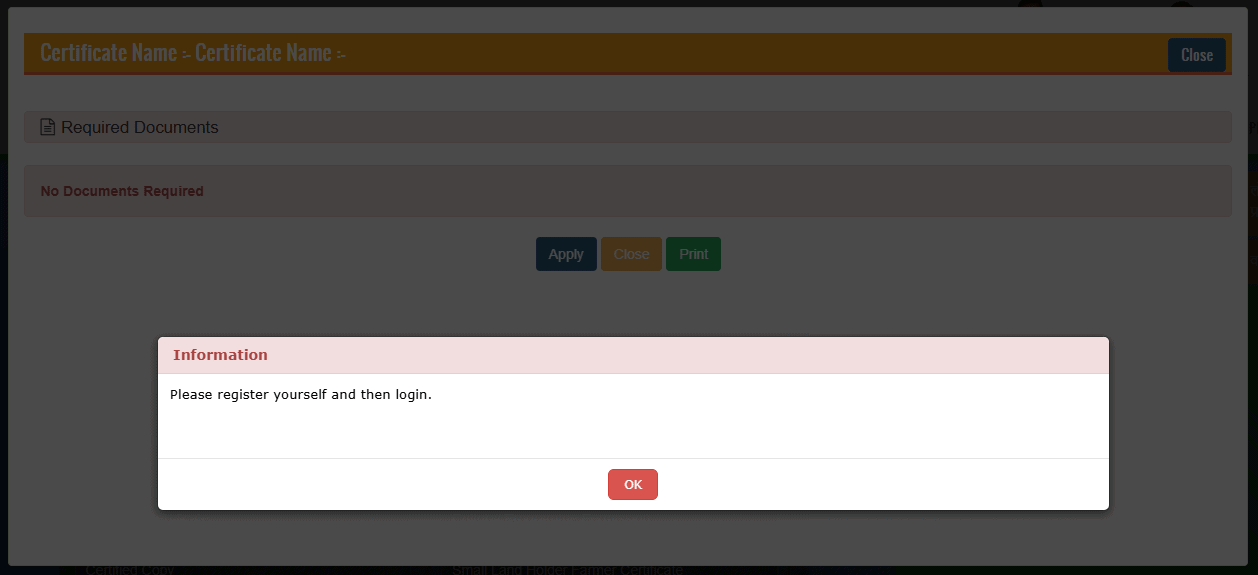
Did I do something wrong? The bright red colour sent me in a panic mode. The title says ‘Information’ but the usage of a colour generally reserved for error states/invalidation/missing information etc. This confirms like little thought was put in designing it.
I wasn’t surprised either way.
Registering Screen:
The registration page is another fine specimen of lazily throwing fields and buttons on a page:
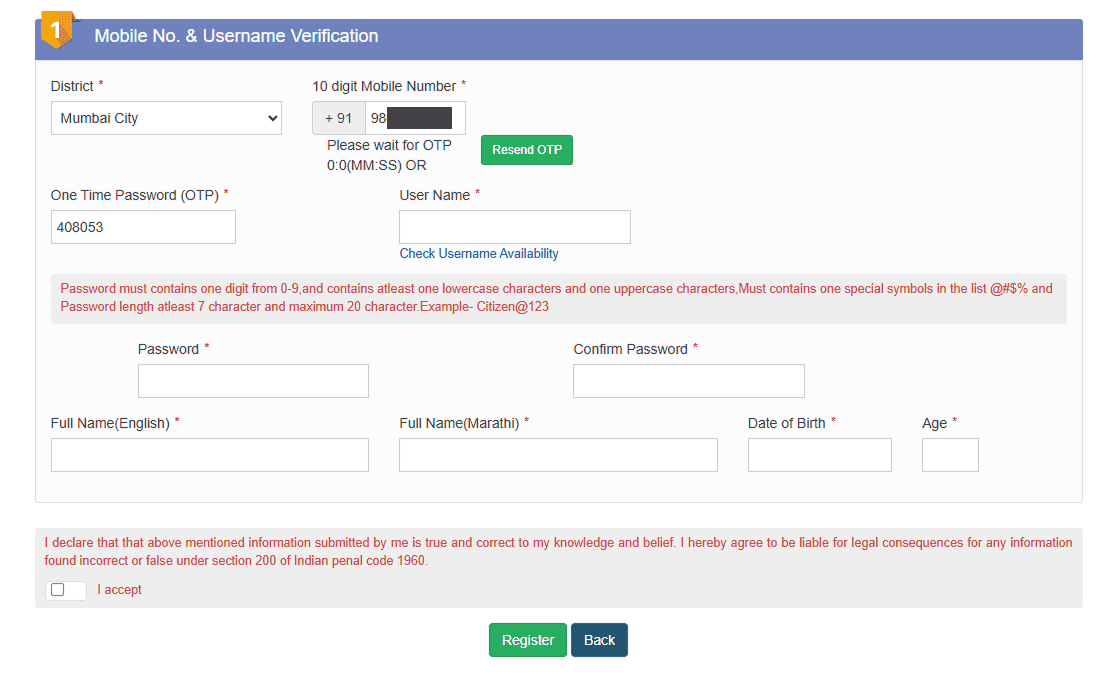
Your eyes immediately notice the red text – even though you have yet to input your password incorrectly, and have still not gotten to point of moving to the next page without accepting the declaration. Generally speaking, bright red text – as mentioned previously – indicates an error message, an invalidation of some kind (such as invalid email address) or to bring attention to missing details etc.
The layout of the fields is haphazard:
- The ‘Resend OTP’ button on the top sits awkwardly next to the mobile number field.
- The OTP field is inline with the username – even though it relates to the mobile number field above.
- The password input fields are floating away from the left margin. They’re so far apart that they seem disconnected with each other.
One thing though that I appreciated in the form is that it translates the English input into Marathi on its own. The ‘Full Name’ field in English when filled, automatically populates the one required for Marathi – which was a huge plus and was very appreciated.
The Chaotic Dropdown:
I don’t remember on which page I encountered this dropdown, but boy do I recall the dropdown itself. The options in the dropdown are nowhere near how they should appear on any website, let alone one run by the government.
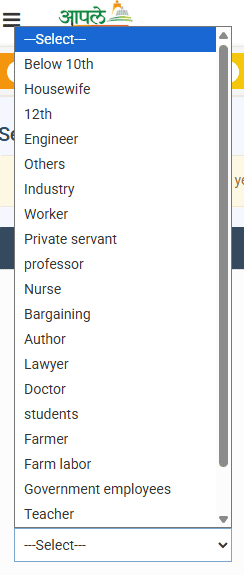
The dropdown merges qualifications and professions together. While some others don’t make any sense being in the dropdown at all.
“Below 10th” and “12th” are qualifications (and such poor choices of words!)
While Nurse, Author, Lawyer is a profession.
But what on earth are these options: Industry. Worker. Bargaining. What?!
And with that, I’ll end the case here. Quite a ride this was.